Rotas on paper and in group chats
A sign-up sheet at the back of church and messages in several groups, and still someone rings round on Saturday.
Churches & Community Venues
Put your Sunday rota, hall bookings and caretaking duties on simple links that people use from their phone, with no account and no app. Volunteers sign up, hirers request a time, and you can see who is coming without ringing round.
For churches, chapels, village halls, community centres and the volunteers and staff who look after them.
The Challenge
A sign-up sheet at the back of church and messages in several groups, and still someone rings round on Saturday.
Nobody notices that refreshments has no one until the morning itself.
Requests arrive by phone, email and in person, and double bookings happen.
Opening up, locking up and checking the building fall to the same volunteers, and nothing is written down.
Free with Shared Schedules
Everything in this section works today and is free with Shared Schedules.
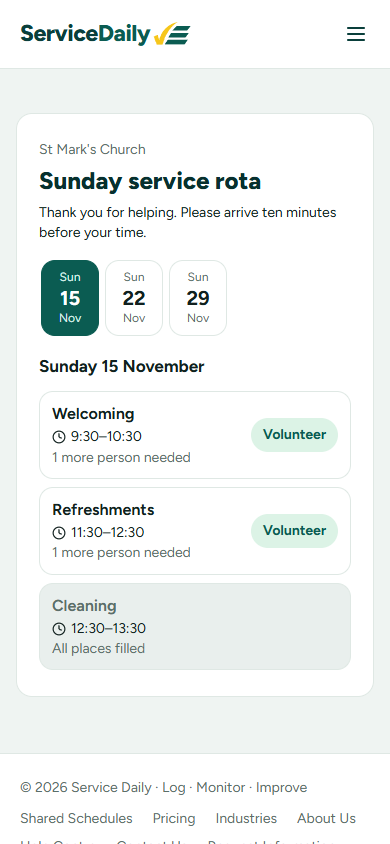
Cleaning, welcoming, refreshments and setting up: each responsibility with its times and how many people are needed. Volunteers put their own name down.
Set it once, for example every Sunday, and the coming weeks appear on their own, up to 12 weeks ahead.
Put it on the notice board or in the weekly notices. It stays the same when you change the times.
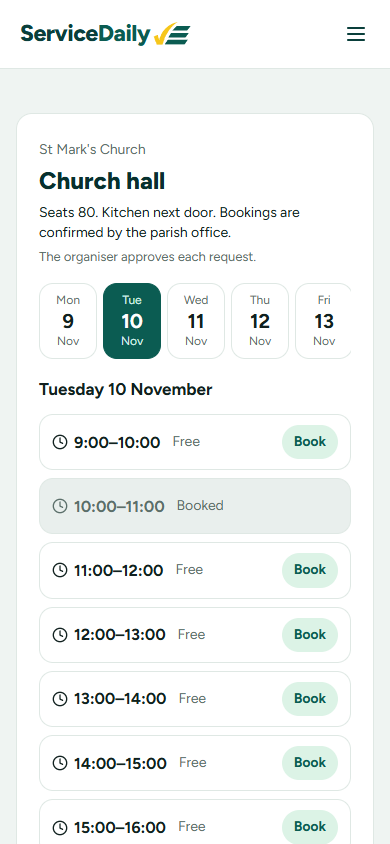
Hirers choose a free time and send a request. You approve each one, or let bookings confirm straight away.
Opening up, locking up and room checks. Assign them yourself, or let members of your organisation claim them.
Everyone gets an email confirmation and a reminder, with a calendar file and a private link to change or cancel.
Service Daily Operations
With Service Daily Operations, available today on a 30-day free trial.
A leak, a broken light or low supplies, reported by anyone in the building with a photo, and no account needed.
Give each report a priority and someone responsible, and record what was done.
Routine cleaning and building checks as repeating jobs with checklists, recorded from a phone.
A cleaning or maintenance contractor using Service Daily can share its visit records with you.
In Practice
St Mark's Church is a fictional example. The pictures are Service Daily's own screens.
Service Daily helps with rotas, bookings and the building. It is not a church management system: it does not handle donations, Gift Aid, membership or pastoral records, or safeguarding management.
Questions
No. They open the link or scan the QR code, choose a time and give their name and email. They confirm from the email we send, and get a private link to change or cancel.
Yes. The free plan has no expiry date and needs no payment details. It includes 2 active rooms or facilities and 2 active volunteer rotas or caretaking schedules, with bookings up to 12 weeks ahead. People booking a public schedule never pay and need no account. Booking and security safeguards apply, such as email confirmation, a bot check and limits on how many bookings one person can hold. If you need another schedule, archive one you no longer use. Its bookings and records are kept. See pricing
Yes. Turn on approval and each request waits for you. If a request isn't answered within 48 hours, or by its start time if that is sooner, it lapses so the hall isn't held up.
No. The public page shows only how many places are left, never names. Organisers see who is coming.
Reporting problems in the building by QR code, following them up, recording routine cleaning and checks, and sharing records with contractors. It has a 30-day free trial. Compare Shared Schedules and Operations
Cleaning and maintenance visibility across sites and providers, with issues followed through.
Free meeting room booking on QR links, shared office jobs, and requests that reach the right person.
Problems reported by tenants, passed to the right contractor and recorded, across every property.
Set up your first schedule in a few minutes. No payment details needed.